YouTube transcript generator
YouTube Transcript Generator for Clean, Readable Video Text
Paste a YouTube link to get text you can copy, download or use with AI.
Turn a YouTube link into a readable YouTube transcript
Paste watch, Shorts, live, or embedded video URLs
Watch, youtu.be, Shorts, embed and live URLs are all accepted.
Convert YouTube to text with captions or AI transcription
We try available captions first, with audio transcription as a fallback when possible. Here is how we transcribe a video with no captions.
Copy or download transcripts in useful formats
Choose plain text, SRT, VTT, or timed JSON
Copy text without timestamps, or download TXT, SRT, VTT or timed JSON from the result.
How to get a transcript in three simple steps
- Paste a YouTube URL.
- Select Get transcript. We use available captions, or audio transcription as a fallback.
- Copy the text or download it in the format you need.
Understand free limits and transcript privacy
Start without an account or create a free account
No account is needed for 10 transcripts every 24 hours (up to 5 of them AI-transcribed when a video has no captions); a free account gets 24. Free transcripts are published to the public library.
Keep transcripts private with a Pro plan
Pro transcripts stay private.
Explore public transcripts and video summaries
Browse recent transcripts with timestamps and download tools
Read recent video transcripts with summaries, timestamps and copy/download tools.
Browse the transcript library →Read transcripts next to the video with our Chrome extension
Tube Transcript for Chrome adds a Transcript button next to CC on YouTube. The transcript opens beside the video and follows along as it plays, so you can search it, jump to any line and keep the parts that matter.
- Sidebar next to the video that follows the current line, with chapters. Open it with the button or Alt+T.
- Search and jump: find a word, then click any line to go to that moment.
- Highlights and notes in five colors, marked on the video's progress bar and collected on one My highlights page.
- Copy or export the transcript as TXT, SRT, VTT or JSON.
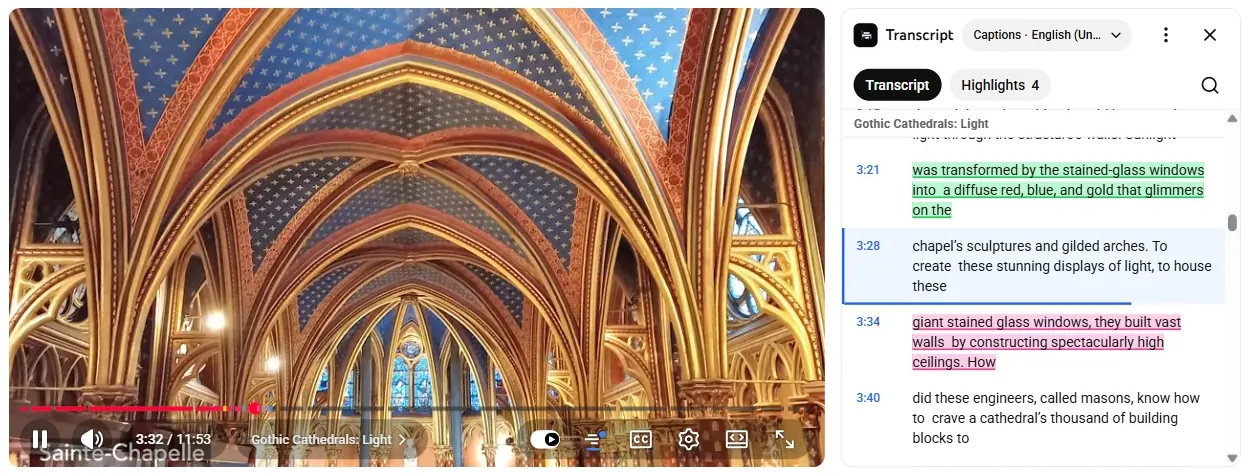
Free · No account · Works locally. Extension privacy
Screenshots show Building a Cathedral without Science or Mathematics by engineerguy (Bill Hammack), licensed CC BY. Tube Transcript is not affiliated with YouTube or Google.
Copy text or download the format you need
- TXT
- Readable text without timestamps, for notes and editing.
- SRT / VTT
- Subtitle files made from timed chunks. Review timing in your player or editor.
- JSON
- Text with start and duration fields, for scripts and source-linked AI workflows.
- Copy text
- Copy the complete transcript without opening a command menu.
Download YouTube subtitles as SRT or VTT for your next editing step.
Use a transcript for your next step
Creators
Start an article, find quotes or outline show notes from your own videos. Review the text before adapting it, and keep links to the source.
Students and researchers
Read a lecture or interview, take notes and use timestamps to check a passage in the original video.
Developers
Retrieve timed JSON through the YouTube transcript API, or connect the MCP server to your AI client with a Pro API key.
Available captions first, audio transcription when needed
Caption extraction and audio transcription are different paths. Available captions usually require less processing. Audio must be downloaded and transcribed, so it takes longer and is subject to availability and audio limits.
Private, removed or restricted videos may not be accessible. Automatic text can contain errors. Pro is advertised for videos up to two hours; the audio limit also depends on deployment configuration. Read our limits and privacy documentation before building an automated workflow.
YouTube transcript questions
Is TubeTranscript free?
Without an account you get 10 transcripts per 24 hours, including up to 5 AI (Whisper) transcriptions of videos without captions. A free account raises this to 24 transcripts per 24 hours. Free and guest transcripts are published publicly. Pro provides private transcripts and API/MCP access.
Can I get a transcript without timestamps?
Yes. Copy text or download TXT from the result. JSON retains timing, and SRT/VTT downloads format the timed chunks as subtitles.
What if the video has no captions?
TubeTranscript first tries available captions. If that fails, it can attempt audio transcription with Whisper, subject to video availability and configured audio limits. This takes longer and may fail.
Does it support YouTube Shorts?
You can paste watch, youtu.be, Shorts, embed and live video links. Accepting a link does not guarantee that an unavailable or inaccessible video can be processed.
What languages are supported?
The result follows the available captions or the transcription engine. Accuracy varies by language, sound quality and speaker. There is no language selector or translation guarantee in the web extractor.
Are my transcripts private?
Free and guest transcripts are public. Pro requests are private to your team. Avoid submitting a video through the free tier if its transcript should not become public.
How accurate is the text?
Captions and speech recognition can contain mistakes. Check important names, numbers and quotes against the original video before publishing or citing them.
For account or billing questions, see Free and Pro pricing or contact support.
Ready to read your video as text?
Use the extractor above. No account is needed for the free tier; its transcripts are public.
Get a YouTube transcriptFree tools for creators
- YouTube Chapter Generator
- YouTube Description + Tags Generator
- Bulk Transcript Downloader
- Shorts Moment Finder
- Hook & Script Analyzer
- Transcript Search
- Translate SRT
- Video to Show Notes / Blog
- SRT Quality Checker
- SRT Merge / Split / Shift
- Filler Word Remover
- Chapter Format Validator
More in the subtitle tools menu.
Connect via REST API or MCP
The REST API has one endpoint, POST /api/v1/extract, that returns a video's transcript as a single JSON payload for scripts, n8n and Make. The MCP servers give Claude Code, Cursor and Windsurf a get_transcript tool over Streamable HTTP, plus AI tools for hooks, mindmaps and blog drafts. Both need a Pro plan API key.
Start with the quickstart, or read how to pass transcript JSON to an LLM.
Practical transcript guides
- YouTube Transcript Not Available? What to Check
Troubleshoot missing YouTube captions, inaccessible videos, quota errors and audio fallback. Know when to retry and when a transcript cannot be retrieved.
- Copy a YouTube Transcript Without Timestamps
Copy readable YouTube transcript text or download TXT. Learn when to keep timestamps in JSON, SRT and VTT instead.